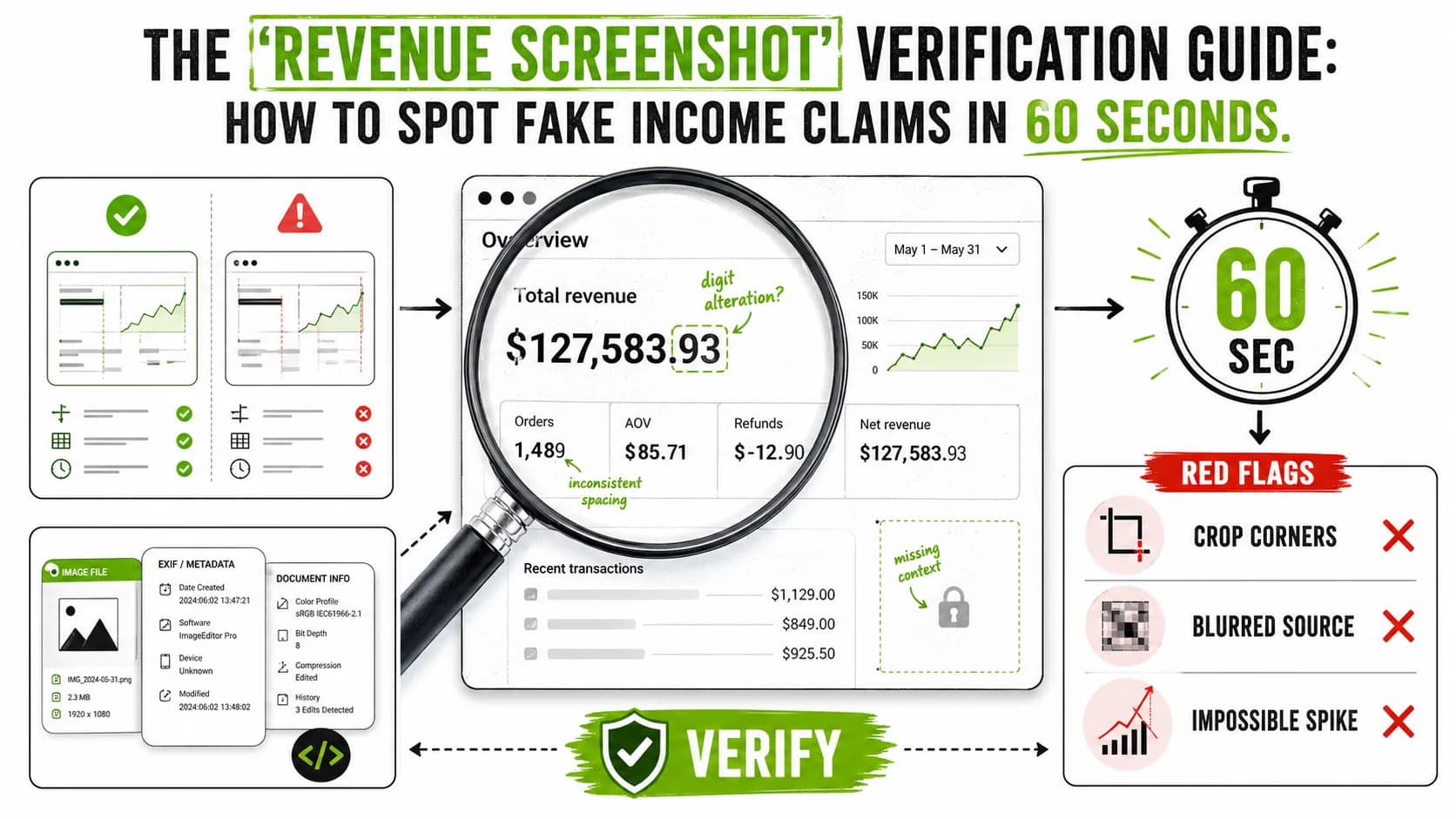
The Revenue Screenshot Verification Guide: How to Spot Fake Income Claims in 60 Seconds
The Screenshot That Launched a Thousand Courses
Somewhere right now, a self-proclaimed guru is cropping a Stripe dashboard in Photoshop, adjusting the font kerning on "$147,000 MRR," and preparing to post it with the caption: "Just hit a new milestone. DM me 'SCALE' for the free framework."
You have 60 seconds before the engagement pods kick in, the reply guys start performing their rehearsed amazement, and the screenshot gets embedded in a Twitter thread that ends with a link to a $997 course. In those 60 seconds, you can determine whether the screenshot is real or fabricated with a degree of confidence that would make most forensic analysts nod approvingly.
This is your field manual. Not theoretical hand-wraving about "be skeptical" — actual, step-by-step techniques you can apply to any revenue screenshot, on any platform, in about the time it takes to microwave a Hot Pocket.
Because the fake income claims industry is now so sophisticated, so industrialized, and so normalized that the FTC received over 2.6 million fraud reports in 2023 alone, with investment and business opportunity scams topping the charts. Screenshots are the currency. Let's learn to counterfeit-check them.
Why Revenue Screenshots Are the Guru's Weapon of Choice
Before we get into verification, it helps to understand why screenshots became the dominant trust signal in the online guru economy.
The answer is embarrassingly simple: screenshots look like proof but require zero proof.
A real audit requires access to bank statements, tax returns, and accounting records. A screenshot requires Inspect Element and 30 seconds. The asymmetry is staggering. The guru gets 95% of the trust signal of actual financial proof with 0% of the accountability. It is, by any reasonable analysis, the highest-ROI deception tool ever invented.
As we explored in The Psychology of Round Numbers, the human brain is wired to accept visual evidence with minimal scrutiny. A screenshot activates System 1 thinking — fast, intuitive, trusting. Verification requires System 2 — slow, analytical, effortful. By the time System 2 wakes up, you have already liked the post, bookmarked the thread, and are considering the payment plan.
The guru economy knows this. That is why the screenshot is sacred.
The 60-Second Verification Framework
Here is the framework, broken into four phases. Each phase takes roughly 15 seconds and catches a different category of fake. You do not need special software. You need a browser, basic arithmetic, and the willingness to be briefly unpopular at parties.
Phase 1: The Pixel Autopsy (15 Seconds)
Open the screenshot in a new tab. Zoom to 200% or more. You are now a forensic technician, and the screenshot is your crime scene.
What to check:
- Font consistency. Every platform (Stripe, PayPal, Shopify, Gumroad) uses specific fonts at specific sizes. Stripe uses a custom variant of their own font family. If the revenue number looks even slightly different from the navigation text — different weight, different anti-aliasing, different baseline alignment — you are looking at an edit. Real dashboards render all text through the same engine. Photoshop edits introduce subtle inconsistencies that become obvious at 200%.
- Pixel alignment. Real UI elements snap to pixel grids. Edited numbers sometimes sit a fraction of a pixel off the baseline, creating a subtle blur or halo effect that native text does not have. Look at the edges of the numbers. Are they crisp or slightly fuzzy compared to surrounding text?
- Color matching. Grab the exact hex value of the revenue text (screenshot it and use any color picker tool). Compare it to other text on the same dashboard. Real Stripe dashboards use
#1A1F36for primary text. If the revenue number is#1B2037or any other near-miss, someone typed that number manually.
- JPEG artifacts. Screenshots shared as JPEGs accumulate compression artifacts. If the area around the revenue number has noticeably different artifact patterns than the rest of the image — smoother, blockier, or with different compression block alignment — that region was edited after the original capture.
Red flag density: If you spot two or more of these issues, stop here. The screenshot is edited. Proceed to Phase 4 (documentation) and move on with your life.
Phase 2: The Math Sanity Check (15 Seconds)
This is where most fake revenue claims collapse. The guru faked the screenshot but forgot to fake the math.
The formula is simple:
Claimed Revenue = Number of Customers x Average Price
Run it:
Example: A guru claims $85,000/month from a $197/month coaching program. That requires approximately 431 active, paying members. Does their Discord have 431 members? Does their course platform show 431+ enrolled students? Can you find even 50 people on the internet who publicly claim to be customers?
If the answer is no, the math does not math.
The SimilarWeb sanity check: Visit SimilarWeb and look up their website traffic. A SaaS product doing $85K MRR typically needs tens of thousands of monthly visitors minimum (assuming a 1-3% conversion rate on a generous day). If their site gets 2,000 visits/month and they claim $85K in revenue, the implied conversion rate is physically impossible unless they are selling yachts.
Phase 3: The Platform Cross-Reference (15 Seconds)
Every real revenue source leaves multiple traces. Screenshots show one trace. Verification requires finding the others.
Stripe specifically:
- Does the screenshot show realistic transaction patterns? Real Stripe dashboards show jagged, irregular revenue graphs with weekend dips. Fake ones show suspiciously smooth upward curves, because fabricating realistic daily variance is tedious and gurus are fundamentally lazy.
- Does the date range selector match the numbers shown? A screenshot claiming "$147K this month" while the date range shows "Last 7 days" is not a mistake — it is a confession.
- Are there cents? As Benford's Law predicts (and as Coffeezilla has documented across dozens of guru exposes), real transaction volumes almost always include cents. A revenue figure of exactly $50,000.00 is statistically implausible for organic transactions.
Cross-platform checks:
- App stores: If they claim app revenue, check Sensor Tower or data.ai estimates. These won't be exact, but they will tell you if someone claiming $100K/month from an app is actually getting 12 downloads per day.
- Shopify stores: Tools like Store Leads can estimate Shopify store revenue ranges. The estimates are rough, but "rough" is enough to distinguish between $100K/month and $100/month.
- Course platforms: Check review counts on Udemy, Teachable landing pages, or Gumroad sales counters. A course with 23 reviews claiming $500K in sales requires each student to have spent approximately $21,739. Unless they are teaching advanced neurosurgery, this is unlikely.
Phase 4: The Metadata and Context Audit (15 Seconds)
The final phase examines the screenshot itself and the context around it.
Metadata checks:
- If you can access the original image file (right-click, save), check the EXIF data. Tools like Jeffrey's EXIF Viewer can reveal the software used to create or edit the image. If the "Software" field says "Adobe Photoshop" instead of a screenshot tool, you have your answer.
- Check the image dimensions. Native screenshots from specific platforms at specific resolutions produce specific dimensions. A Stripe dashboard screenshot from a 1440p monitor will have predictable dimensions. If the image is 1080x720 — a common Photoshop canvas size — suspicion is warranted.
Context checks:
- Timing patterns. Do they only post revenue screenshots at the start of a launch cycle? Real revenue exists all the time. Performative revenue appears on schedule.
- Cropping. Why is the screenshot cropped to show only the revenue number and nothing else? A real dashboard has navigation, account details, and date ranges. Cropping removes context — and context is where lies unravel. As we covered in 15 Red Flags That Scream Fake Entrepreneur on Twitter, selective framing is one of the oldest tricks in the book.
- The "I don't usually share this" qualifier. If someone prefaces a revenue screenshot with "I don't usually share my numbers," they are about to share numbers that do not deserve to be shared. This is the verbal equivalent of "I'm not racist, but..." — whatever follows the disclaimer contradicts it.
The Verification Checklist
Use this as a quick-reference. Print it, tattoo it on your forearm, set it as your phone wallpaper — whatever works for your lifestyle.
| Check | What to Look For | Time | Fail = Likely Fake |
|---|---|---|---|
| Font consistency | Mismatched typefaces, weights, or anti-aliasing | 3 sec | Yes |
| Pixel alignment | Blurry or off-grid numbers vs. crisp UI elements | 3 sec | Yes |
| Color accuracy | Revenue text color differs from platform standard | 3 sec | Yes |
| JPEG artifact analysis | Different compression patterns around edited areas | 3 sec | Yes |
| Round number check | Revenue ending in .00 or perfectly round thousands | 2 sec | Suspicious |
| Customer math | Claimed revenue / price = impossible customer count | 5 sec | Yes |
| Traffic sanity | SimilarWeb traffic vs. implied conversion rate | 5 sec | Yes |
| Graph realism | Smooth curves, no weekend dips, no variance | 3 sec | Yes |
| Date range match | Selector period vs. displayed revenue amount | 2 sec | Yes |
| Cents present | Benford's Law compliance in transaction amounts | 2 sec | Suspicious |
| EXIF metadata | Photoshop or editing software in image metadata | 5 sec | Yes |
| Crop analysis | Why is only the number visible? | 2 sec | Suspicious |
| Context timing | Screenshots appearing only during launches | 5 sec | Suspicious |
| Third-party corroboration | Any independent data matching the claim | 10 sec | Yes |
Scoring: 0-1 flags = plausible (not confirmed real, just plausible). 2-3 flags = suspicious and warrants deeper investigation. 4+ flags = the screenshot is almost certainly fabricated or manipulated. Proceed accordingly, which means: do not buy the course.
The Five Most Common Fabrication Methods (And How Each One Fails)
Understanding how fakes are made helps you spot them faster. Here are the five methods, ranked from amateur to professional.
Method 1: Inspect Element (Difficulty: Kindergarten)
Right-click on any web page, select "Inspect," and you can change any number to anything. A $47 balance becomes $470,000 with a few keystrokes.
How it fails: The change exists only in the browser's local DOM. If the guru shares a video of themselves "scrolling" the dashboard, watch for page refreshes — the numbers will revert. In screenshots, Inspect Element edits often leave telltale signs: the edited text may inherit different CSS properties, creating subtle spacing or alignment differences from the original rendered text.
Method 2: Photoshop/Image Editing (Difficulty: High School Art Class)
Export a real screenshot, open in Photoshop, type new numbers over the old ones using a matched font.
How it fails: Font matching is harder than it looks. Stripe's typography, for example, uses custom font rendering that commercial fonts cannot perfectly replicate. The pixel-level differences become obvious at zoom. Additionally, JPEG re-compression creates artifact inconsistencies between edited and unedited regions.
Method 3: Fake Dashboard Generators (Difficulty: Ordering from a Menu)
Multiple services now sell realistic dashboard mockups. Pay $29, enter your desired numbers, and receive a pixel-perfect "Stripe dashboard" screenshot.
How it fails: These generators work from templates, and templates lag behind platform updates. If Stripe updated its UI three months ago but the screenshot shows the old layout, the generator has not caught up. Also, these tools often fail on subtle details: incorrect footer text, wrong API version indicators, or outdated notification badge designs.
Method 4: Real Account, Fake Revenue (Difficulty: Requires Planning)
Send money from one account to another through the platform, screenshot the "revenue," then reverse the transactions. More sophisticated gurus use multiple PayPal accounts, Stripe Connect sub-accounts, or coordinated customer "purchases" that get refunded after the screenshot.
How it fails: Refund rates. A Stripe account that processes $150K in revenue but has a 90% refund rate is a money-laundering operation, not a business. While the guru won't show you the refund data, the math check from Phase 2 still catches this: the revenue is "real" in Stripe but impossible given the size of the actual customer base.
Method 5: Misattributed Revenue (Difficulty: MBA-Level Lying)
Show real revenue from Source A while implying it came from Source B. A guru with a legitimate consulting business showing that revenue while implying it comes from their course, for example.
How it fails: This is the hardest to catch because the numbers are real. Your defense is the cross-reference check: if the guru claims $200K/month from course sales, but their course platform shows 340 lifetime students at $297, the revenue is coming from somewhere else. Coffeezilla's investigations have repeatedly exposed this technique, most notably in his series on Kevin David where claimed "Amazon FBA" revenue was actually from course sales about Amazon FBA.
Real-World Patterns From FTC and BBB Data
This is not theoretical paranoia. Federal agencies have documented the scale of this problem with uncomfortable precision.
FTC data points:
- The FTC's Consumer Sentinel Network received reports of over $10 billion in fraud losses in 2023, with investment scams and business opportunity scams consistently ranking in the top categories. Fabricated income proof is the entry drug for these scams.
- According to the FTC's 2023 report, social media was the contact method for fraud in cases totaling $1.4 billion in reported losses — more than any other contact method. Revenue screenshots are the visual anchor of social media-based fraud.
BBB Scam Tracker data:
- The Better Business Bureau's Scam Tracker consistently flags "business opportunity" scams, where victims are shown fabricated revenue proof before purchasing courses, coaching, or "systems." The median loss is in the thousands, but outliers reach six figures.
The Coffeezilla standard:
YouTube investigator Coffeezilla (Stephen Findeisen) has methodologically exposed dozens of fake income claims using many of the same techniques in this guide. His investigation of SafeMoon, his exposures of Logan Paul's CryptoZoo, and his series on various course gurus all began with the same question: "Does the math behind the screenshot actually work?" It almost never did.
The pattern is consistent: the screenshot is the hook, the course is the product, and the revenue claim is the lie that connects them.
Advanced Techniques for the Deeply Suspicious
If you have passed the 60-second mark and still want more certainty, these techniques take longer but yield stronger conclusions.
Wayback Machine analysis: Archive.org captures historical versions of websites. If a guru claims their product has been generating $100K/month for two years, but the Wayback Machine shows their product page only appeared 4 months ago with completely different pricing, the timeline is fabricated. The Metrics Obsession problem runs deep — many gurus are more invested in the narrative of success than the actual construction of it.
LinkedIn employee check: A company doing $1.2M ARR typically has employees. Check LinkedIn. If the "team" page shows 8 people but LinkedIn shows only the founder (and maybe a VA in the Philippines), the revenue probably cannot support the implied headcount, because the headcount does not exist.
State business registry: Every legitimate business is registered somewhere. Search the state's Secretary of State business database. If the guru claims to run a seven-figure company but has no registered LLC, corporation, or DBA, the "company" exists only on Twitter.
Court record search: PACER (federal courts) and state court databases can reveal lawsuits, FTC actions, or bankruptcy filings. A guru claiming $50K/month who filed for Chapter 7 bankruptcy eight months ago has a credibility problem that no screenshot can fix.
The Psychology of Why This Works
Understanding why fake screenshots are effective helps inoculate you against them.
The Authority Cascade: Revenue screenshot posted, engagement pods activate, real users see high engagement, assume legitimacy, engage themselves, creating more social proof, attracting more real users. By the time the screenshot has been live for 2 hours, it has generated its own self-reinforcing credibility loop — regardless of whether the underlying numbers are real. As we documented in Why People Fall for Fake Entrepreneurs, this cascade exploits multiple cognitive biases simultaneously.
The Anchoring Effect: Once you have seen "$147,000 MRR," your brain anchors to that number. Even if you are skeptical, the anchor persists. When the guru later offers a $997 course, your brain unconsciously compares it to the $147K anchor: "If they make that much, $997 is nothing for access to their knowledge." The screenshot's job is not to convince you it is real. Its job is to set the anchor.
The Competence Halo: A revenue screenshot creates a halo effect across all other claims. If they make $147K/month, their advice must be good, their course must be valuable, their strategy must work. One fabricated data point elevates everything else they say. This is why gurus invest more effort in screenshot quality than course quality — the screenshot sells the course, not the other way around.
What To Do When You Catch a Fake
Catching a fake screenshot is satisfying. Here is what to do with that satisfaction.
Do:
- Note the specific inconsistencies you found. Be precise. "The font rendering on the revenue number differs from the navigation text at 200% zoom" is useful. "It looks fake" is not.
- Check if the guru is selling a product based on the fabricated income claim. If yes, this may constitute fraud under FTC guidelines on deceptive advertising.
- Report to the relevant platform (Twitter/X, Instagram, YouTube) with specific evidence.
- Report to the FTC at ReportFraud.ftc.gov if a product is being sold based on fabricated income claims.
- Share your analysis publicly (with evidence) to help others avoid the scam.
Do not:
- Engage in harassment or pile-on behavior. Document and report.
- Assume malice without evidence. Some screenshots are misleading through incompetence rather than intent (showing gross revenue when they meant net, for example).
- Spend more than a reasonable amount of time on any single guru. Your time is worth more than their grift.
Frequently Asked Questions
Can revenue screenshots ever be trusted?
Not as standalone evidence, no. A screenshot is a claim, not proof. Trustworthy founders supplement screenshots with verifiable context: named customers you can contact, third-party integrations showing consistent data (like Baremetrics public dashboards or Open Startup pages), tax documents, or independent audits. If the screenshot is the only evidence, treat it as unverified marketing material, because that is exactly what it is.
What about video recordings of dashboards? Are those harder to fake?
Slightly harder, but not hard enough to trust. Inspect Element works just as well on video as it does in screenshots — just do not refresh the page on camera. More sophisticated fakers use browser extensions that modify DOM elements persistently, or screen-share a real dashboard that has been inflated through refund cycling. Video adds friction to fabrication but does not eliminate it. Apply the same math and cross-reference checks regardless of format.
Is it legal for gurus to post fake revenue screenshots?
If the screenshot is used to sell a product or service, fabricated income claims may violate FTC regulations on deceptive advertising (16 CFR Part 255). The FTC's Endorsement Guides explicitly state that income claims must reflect typical results, and fabricated screenshots obviously fail that standard. Several state attorneys general have also pursued cases against online course sellers making unsubstantiated income claims. Whether any specific case leads to prosecution depends on jurisdiction, scale, and whether someone reports it.
What if the guru provides a live screen share instead of a screenshot?
Live screen shares are better than static screenshots but still not proof. A determined faker can prepare a modified browser environment, use Stripe test mode with production-like styling, or show a real account that has been temporarily inflated through circular transactions. The key question remains the same: does the claimed revenue make mathematical sense given the visible customer base, traffic data, and product pricing? If the numbers do not add up, the format of the "proof" is irrelevant.
How common are fake revenue screenshots in the guru space?
No rigorous academic study has quantified the exact rate, but available evidence suggests the problem is pervasive. Coffeezilla and similar investigators have exposed fakes across virtually every niche: dropshipping, Amazon FBA, course creation, agency models, SaaS, and cryptocurrency. The FTC's fraud report data shows business opportunity scams consistently ranking among the most reported fraud categories. A reasonable prior, based on the available evidence, is that the majority of revenue screenshots posted in "how I make money online" contexts are either fabricated, misleading, or missing crucial context like refund rates and expenses.
What is the single fastest way to spot a fake?
The math check. It takes 15 seconds and catches roughly 80% of fakes. Take the claimed revenue, divide by the product price, and ask yourself: is there any evidence that this many paying customers exist? If a $49/month tool claims $100K MRR, that requires 2,041 paying customers. Can you find even 20 real users on the internet? If not, the screenshot is almost certainly fabricated. You do not need pixel analysis or metadata tools when basic arithmetic already proves the claim impossible.
The Uncomfortable Truth
The revenue screenshot economy persists because it works. Not because the screenshots are convincing — they often are not — but because people want to believe. The dream of financial freedom, of escaping the 9-to-5, of joining the elite club of "successful founders" is powerful enough to override skepticism.
Your 60-second verification framework is not just a technical tool. It is a psychological defense mechanism. It forces System 2 thinking before System 1 can commit your credit card number to a checkout page.
Use it every time. Share it widely. And the next time someone posts a beautifully cropped Stripe dashboard with a perfectly round number and the caption "Just hit another milestone, grateful for this journey" — smile, run the checklist, and enjoy the quiet satisfaction of seeing through the performance.
The gurus are selling screenshots. You are no longer buying.
<!-- sister-projects-start -->
Other Doved Studio projects
Related tools from the same studio you might find useful:
- Ralphable: Generate structured Claude Code skills that iterate until pass/fail criteria are met.
- Doved Studio: Studio indie derrière cette app et une dizaine d'autres outils.
<!-- sister-projects-end -->